How do I activate my Centtrip card?
-
VIRTUAL CARDS - virtual cards are automatically activated upon creation. You can view your card details in the app and add it to your mobile wallet for contactless payments.
-
PHYSICAL CARDS - follow the steps below to activate your physical card and manage it within the Centtrip app.
-
IMPORTANT - once signed into the app, you may need to switch accounts or switch cards if you have access to more than one.
Card Activation Steps - Physical Cards:
1) Sign into the app
As a cardholder, account access is via the Centtrip mobile app.
- Check for an activation email and follow the link to create a secure password. Can't find this?
- Download the Centtrip app to your iOS or Android device.
- Sign in using your email address and new password
2) Activate your Centtrip card
Once you receive your card, you can activate it in the app. Please note - virtual cards do not require activation.
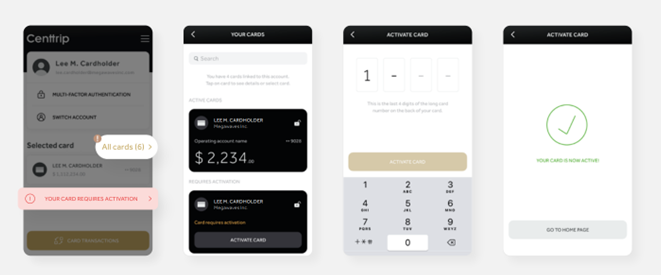
- Tap 'NEW CARD REQUIRES ACTIVATION' (if you do not see this, select 'All Cards')
- Locate your new card under 'REQUIRES ACTIVATION' and press 'ACTIVATE CARD'
- Enter the last four digits of your long card number and then ‘ACTIVATE CARD’
- Once complete, your card will be ready to use and can be managed using the Centtrip app.
3) Reveal your PIN
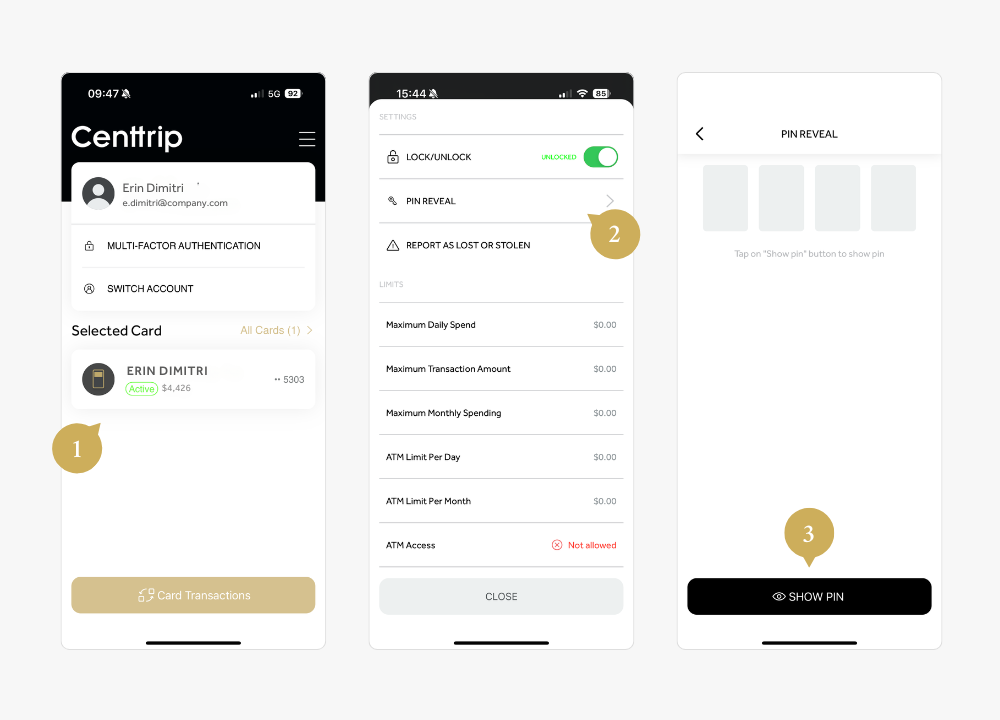
- Open the app and tap on your card.
- Pull the settings menu up from the bottom of the screen and select PIN REVEAL.
- Press SHOW PIN and enter your security information to view your PIN.