How do I switch between my Centtrip cards within the app?

  1. Open the app and check which card is currently selected.
  2. Switch Cards - tap ALL CARDS - to switch to another card within the same account.
  3. Switch Accounts - from the app menu, tap Switch account to view cards in another account.
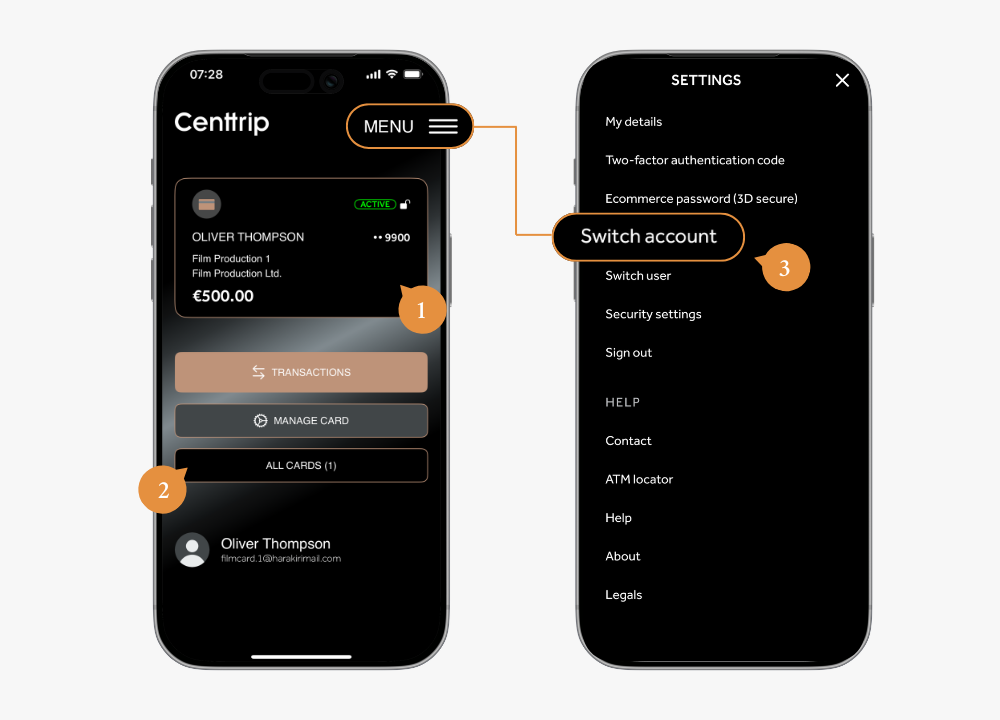
Global App - Switch cardaccount (2)
Last updated on 18th February 2026

Didn't find what you were looking for?

If you have any questions, please do not hesitate to get in touch by emailing [email protected] or calling us on +1-929-930-3383 (Monday to Friday 8:30 to 17:30 Eastern time).