Where can I find my account load details?
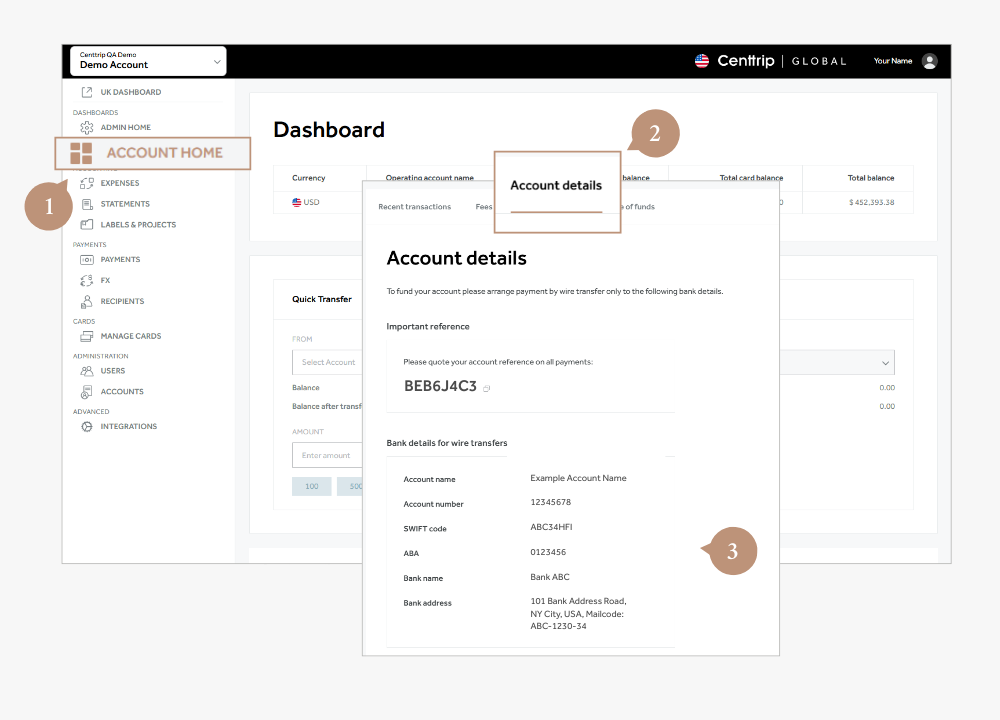
- Sign into your Centtrip Global account and visit your Account Home.
- Scroll down to the Recent transactions section of the screen.
- Switch to the Account details tab to view the correct payment details.
- Choose the currency you wish to load (if applicable).
The details will be displayed on-screen.
Important:
- Please include your unique reference (as shown on screen) to ensure funds are allocated to the correct account without delay.
- Payments must be sent from the bank account specified during your application (as listed under the Source of funds tab).
- To receive payment from a third party, please set up the payee as an Approved Third Party (ATP)